


S2 Pass
4.830.00 Reviews
App Specs
- Version
- 1.4.6
- Updated On
- License
- Free
- Downloads
- 50,000+
- Developer
- S2 Pass
- Categories
- Sports
- Platform
- Android
Screenshots
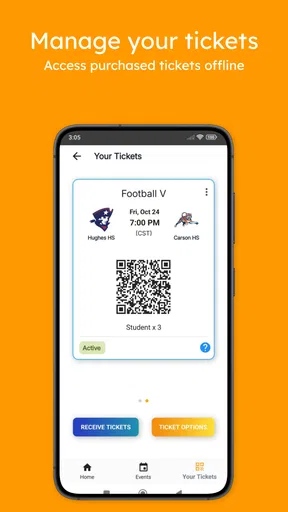
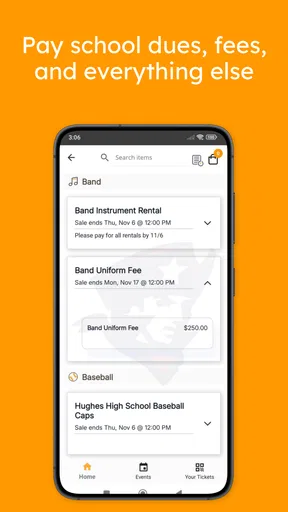
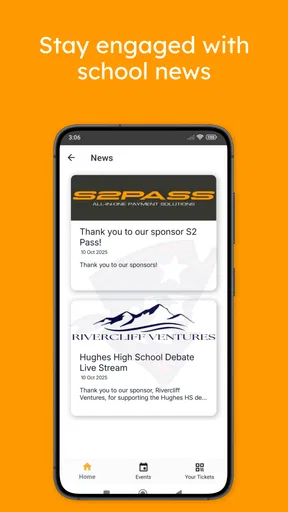
 Analysis by AppCompare
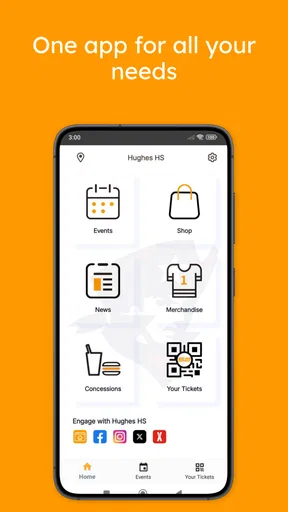
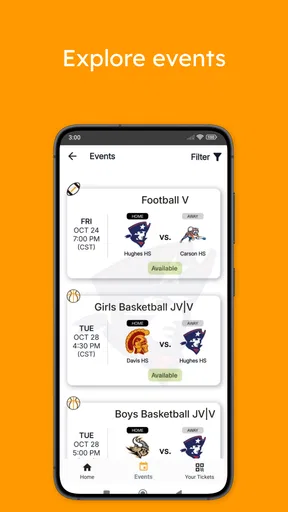
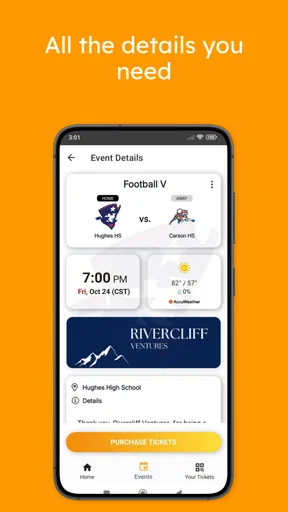
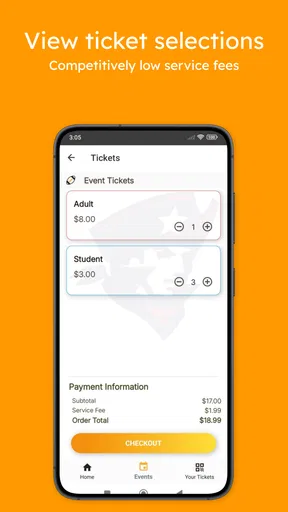
School administration rarely becomes difficult because of one big task. It is usually the small interruptions that cause trouble: finding the right ticket, remembering a fee deadline, or discovering that an important school message is sitting in a separate place. S2 Pass is built around bringing those school-related jobs into one mobile app, and after spending time with it, I found its main value is practical rather than flashy. It is a sports-category app from S2 Pass, but its role is closer to a school community pass and payment companion than to a conventional sports tracker.
The app is free, aimed at everyone, and available for devices running Android 6.0 or later. Its current version is 1.4.6, and it has attracted over fifty thousand installs with a strong average rating of 4.8 from nearly two hundred ratings. Those figures suggest that the people who find a matching school use case tend to appreciate it. My experience was more nuanced: the central idea is useful, but the quality of the experience depends heavily on having the correct school connection, account details, and payment context ready before you begin.
Where the first attempts usually get stuck
The most important thing to understand before installing S2 Pass is that it is not a general-purpose wallet or an open ticket marketplace. Its usefulness depends on the school community it is intended to serve. If you are expecting to browse unrelated sporting events, manage every kind of household bill, or use it as a broad communication platform, you may find the app narrower than expected. Its focus is school-linked activity: buying tickets, paying school fees, and keeping in touch with the relevant community.
That focus is a strength once the app is connected to the right context, but it can make the first session feel less obvious than a typical shopping or payment app. A new user may open it expecting to see a full catalogue immediately, while the useful content may depend on identifying the school or entering the details associated with the school account. I recommend treating the first launch as an account-and-community setup step, not as a quick browse.
Another common point of friction is using the wrong identity. Families sometimes share devices, email addresses, or payment cards, and a school-related app can become confusing when one person starts a process that belongs to another student or household member. Before tapping through, I would make sure you know whose fees or tickets you are handling and which school connection should appear. This simple check prevents a surprising amount of backtracking.
The same applies to ticket purchases. A ticket task is not just a payment task; it normally involves selecting the correct school activity or event context. If several family members are involved, pause before confirming and check that the selection matches the person attending. I would rather spend a few extra seconds reviewing the screen than discover later that I completed a valid transaction for the wrong purpose.
Payment-related hesitation is also understandable. S2 Pass brings school fees and tickets together, so users may assume that every payment problem comes from the app. In practice, a declined card, an outdated billing detail, a bank security check, or a temporary connection issue can interrupt the process even when the app itself is working normally. The safest approach is to separate the steps: first confirm the school and item, then check the payment method, and only afterward retry.
Worth Reading Before You Choose

Flipboard Shows What News Apps Must Do Beyond the Feed

Switching to Android Auto Means Rethinking Your Driving Routine

Google Calendar Makes a Crowded Week Easier to Manage

Ludo King Makes the Most of the Minutes Between Plans

Baby Panda World Brings Quick Play to Modern Phones, but Its Game Library Feels Busy

ESPN’s Live Game View Makes Following Close Games Easier
For a parent handling several school tasks at once, the app can reduce the need to search through messages and separate websites. For a student who only needs occasional access, however, the setup may feel like more work than the task itself. That is an important trade-off. S2 Pass is most convincing when it replaces repeated school administration, not when it is used for one isolated action every few months.
What to prepare before creating a routine
I would begin with a stable internet connection and enough time to read each screen. This is not because the app is complicated in every situation, but because rushing a school payment or ticket selection creates avoidable mistakes. Keep the relevant school information nearby, and decide whether you are handling a fee, a ticket, or a community update before starting. Having a clear purpose makes the interface easier to interpret.
It is also worth checking that your device is compatible. The app supports Android 6.0 and later, so older phones may be excluded even though the app itself is free. On a supported device, I would make sure the operating system is behaving normally, storage is not critically low, and the app has been updated to version 1.4.6 if that is the version offered on your device. These are ordinary checks, but they matter more when the app is being used for a deadline-sensitive payment.
When the app asks you to identify the school community or account context, enter information carefully rather than guessing. A near match can be more troublesome than an obvious error because it may lead you into the wrong area before the problem becomes apparent. If the school name, student association, or fee description looks wrong, stop there and correct the setup instead of trying to work around it.
The best setup habit is to verify the school context before touching the payment step. That single habit helps distinguish a configuration problem from a transaction problem. It also makes later use faster, because you are less likely to repeat the same setup or abandon a payment halfway through.
Families should think about who will be the regular user. If one parent manages all fees and tickets, keeping the workflow consistent may make S2 Pass feel straightforward. If several people use the same phone, write down the household’s preferred process in a private place: who checks the student details, who confirms the ticket, and who keeps the payment record. The app can centralize the task, but it cannot decide which family member should own that responsibility.
Privacy and device habits deserve ordinary attention too. Use your own device profile where possible, avoid leaving a payment screen open in a shared environment, and review the confirmation before closing the app. I am not suggesting unusual risks; these are sensible habits for any application that combines school information with purchases.
Recovering a stalled fee or ticket workflow
When a transaction appears to stop, the first question is whether anything was actually submitted. Repeatedly tapping a payment control can create uncertainty, especially if the connection is slow. I would first look for an in-app confirmation or a visible change in the relevant school item before trying again. If there is no clear result, close the app normally, reopen it, and check the same area once more rather than immediately submitting duplicate attempts.
If the app returns you to an earlier screen, retrace the workflow slowly. Confirm the school context, confirm the student or household association, review the fee or ticket selection, and then revisit payment. This sequence is more useful than simply restarting because it identifies the point where the process changed. If the same step fails repeatedly while other parts of the phone work normally, note the exact screen and message before seeking help through the appropriate school or service channel.
A weak connection can make a successful action look unsuccessful. Moving to a more reliable network, waiting briefly, and reopening the app can clarify whether the issue was temporary. I would avoid switching networks in the middle of a payment unless the screen is clearly idle, because changing conditions during submission can make the outcome harder to understand. The goal is not to force the transaction through; it is to establish whether the previous attempt completed.
For tickets, keep the event details visible until you are certain the purchase is complete. A screenshot may be useful for your own record if the app displays a confirmation, but it should not replace checking the actual status inside the app or following the school’s normal entry instructions. The practical lesson is to preserve evidence of what you selected and when, without assuming that a loading screen equals a completed purchase.
Fee payments deserve the same discipline. Before retrying, check whether your bank or card provider has shown a pending or completed transaction. If money appears to have moved but the school item still looks unpaid, do not immediately pay again. Record the relevant details and contact the responsible support route. The app is the place where you initiate the action, but payment settlement and school account updates may involve systems outside the app.
Notifications can also mislead users if they arrive late or are dismissed. I would treat the app’s visible status as the starting point and keep any confirmation messages until the task is fully resolved. If a family regularly pays several fees, handling them one at a time and confirming each result is safer than rushing through a long sequence.
Separating an app problem from a school or payment problem
Because S2 Pass connects several parties, not every missing item is an application failure. A school may not have published a particular fee, an event may not be available to the account you are using, or an update may not yet be reflected. If the app opens normally but one expected school item is absent, I would first verify that you are in the correct community and that the school has actually made the item available.
This is where S2 Pass differs from a generic payment app. A general wallet may show a transaction history but know nothing about a school’s event schedule or fee structure. A school website may contain announcements but require separate steps for payment. S2 Pass is appealing when the school’s workflow is supported in one place. It is less useful if your school still handles most information through email, paper notices, or a separate portal, because you may continue switching between systems.
The developer, S2 Pass, has positioned the app around that connection rather than around broad financial management. I would not choose it as my main budgeting tool, a sports training log, or a replacement for every school communication method. It should be judged on whether it makes the specific school tasks it supports easier to find and complete.
There is a similar distinction with support. If the app crashes, refuses to open, or repeatedly fails at the same interface step, the app deserves suspicion. If the app works but a fee is missing, a ticket is unavailable, or a payment remains pending, the school or payment side may be the more relevant place to ask. Knowing this distinction saves time and prevents blaming the wrong service.
Users should also be realistic about device age. Android 6.0 compatibility is helpful for older hardware, but compatibility alone does not guarantee a smooth experience on every phone. A device with an outdated browser component, unstable system software, or aggressive background restrictions can interfere with many apps. If S2 Pass behaves oddly while other applications also struggle, I would troubleshoot the phone before concluding that the service is at fault.
Compared with using a browser, the app’s main advantage is convenience: school tasks are gathered into a mobile-oriented workflow instead of being scattered across bookmarks, messages, and paper reminders. The browser alternative may still be better for someone who rarely uses the service, prefers a larger screen, or needs to compare several school documents at once. S2 Pass makes more sense for repeated, on-the-go actions than for detailed record keeping.
Everyday use: a realistic family workflow
Imagine a parent receives a school reminder about an upcoming event and also needs to handle a fee. Rather than opening the reminder, searching for a separate ticket page, and then locating another payment route, the parent can use S2 Pass as the first place to check. I would open the app, confirm the correct school connection, review the event or fee carefully, and complete only the task that is ready. After each action, I would verify the result before moving to the next one.
The useful insight here is not simply “one app does several things.” It is that the order of operations matters. Start with identity and school context, move to the specific item, then confirm payment or ticket status. This creates a repeatable routine that is easier to explain to another family member and easier to troubleshoot when something goes wrong.
For a student, the routine may be shorter: open the app when a school instruction specifically points to it, check the relevant item, and avoid changing account details casually. Students who only need to show a ticket may value quick access, while parents managing fees may care more about confirmation and avoiding duplicate payments. The same app therefore serves different needs depending on who is holding the phone.
Community connection is another part of the appeal, but I would keep expectations practical. S2 Pass can help keep school-related activity together, yet it should not be treated as a complete replacement for direct communication with teachers, administrators, or event organizers. If a detail is urgent or unclear, use the school’s established contact route rather than relying on an app entry alone.
Who should use it, and who should choose another route?
I would recommend S2 Pass to families whose school actively uses it for tickets, fees, and community information. It is particularly suitable for parents who are tired of juggling several school-related processes and want a single mobile starting point. The free price also makes it easy to try without committing to a subscription, while the Everyone age rating keeps it broadly accessible for households.
I would be more cautious if your school rarely uses the service or if you only need a one-off transaction. In that situation, the school’s direct website or an existing payment instruction may be quicker. Someone who wants detailed financial categorization, advanced sports statistics, or a full messaging suite should also look elsewhere; those are not the reasons to install this app.
The rating of 4.8 and the install base of more than fifty thousand show that S2 Pass has found a satisfied audience, but I would not read those figures as a guarantee that every school workflow will feel identical. The decisive question is local usefulness: does your school publish the things you need, and can your household keep the account context clear? If the answer is yes, the app’s focused design becomes an advantage.
My final view is positive, with a clear condition. S2 Pass is a sensible school administration companion when it is part of an active school process. I like the way it brings ticket buying, fee payments, and community connection into one place, and I think its strongest benefit is reducing the number of separate paths a parent must remember. At the same time, setup accuracy matters, and the app cannot solve missing school information, bank decisions, or unclear instructions from outside its own workflow.
If you install it, begin with the school connection rather than the payment button, use one careful task at a time, and confirm every result before repeating an action. That approach addresses most of the practical friction I encountered. For the right school community, S2 Pass is worth keeping on the phone; for everyone else, it is better viewed as a specialized tool than as a universal school or sports app.
Pros
- Quick access to supported services with a single pass.
- Reduces the need to manage several separate access credentials.
- Simple interface that is easy to understand for new users.
- Useful for checking pass details and account information on the go.
- Digital access can be more convenient than carrying a physical pass.
Cons
- Available features may vary depending on your region or provider.
- Requires a compatible device and reliable internet for some functions.
- Not all participating services may accept the digital pass.
- Account or pass verification can occasionally take extra time.
- Privacy-conscious users may dislike sharing account or location data.
FAQs for S2 Pass
What is S2 Pass and what is it used for?
S2 Pass is a digital access and authentication application designed to help users manage entry, verification, or pass-related services from a mobile device. Depending on the organization or service providing it, the app may be used to display a digital pass, confirm identity, access restricted areas, or handle event and membership credentials. Its exact functions can vary, so users should check the official service requirements before downloading.
Is S2 Pass free to download and use?
The S2 Pass application may be available to download without an upfront charge, but that does not necessarily mean every associated service is free. Some passes, memberships, events, subscriptions, or organization-specific features may require payment outside or inside the app. Before installing, review the official listing and the terms provided by the organization that issued your pass to understand possible fees.
What information or permissions does S2 Pass require?
S2 Pass may request access to information needed for authentication and pass management, such as your name, email address, account details, or an identification code. Depending on how it works, it could also request camera access for scanning QR codes, notifications for updates, or internet access for verification. Review the permission prompts carefully and only grant access that is necessary for the service.
Does S2 Pass work without an internet connection?
Offline functionality depends on how the pass is issued and verified by the organization behind S2 Pass. Some digital credentials may remain available after they have been downloaded, while other passes require an active internet connection to refresh a QR code, confirm validity, or synchronize account information. It is best to open and update the pass before traveling or entering a location with limited connectivity.
Is S2 Pass safe and compatible with my device?
S2 Pass should be downloaded from a trusted official source, such as Google Play or the Apple App Store, to reduce the risk of installing a modified or fraudulent version. Compatibility depends on your Android or iOS version, device security settings, and the requirements set by the service provider. Keep the app and operating system updated, use a secure screen lock, and avoid sharing pass credentials or verification codes.


